Is your Stocky data ready
to migrate?
Shopify's own migration guide says suppliers can't be exported from Stocky and historical purchase orders can't be imported. See exactly what's at risk — and what's ready to move — in 60 seconds.
Free forever. Nothing stored. No account required.
Migration Report
Illustrative- ✓ Suppliers (24) Ready
- ✓ Cost prices (847) Ready
- ⚠ Purchase orders (12) 2 warnings
- ✗ SKU cross-check 3 orphans found
This is what you get back
Upload your three Stocky exports and the checker returns a real compatibility report — every supplier, cost price and purchase order validated row by row, plus a SKU cross-check against your Shopify catalog so nothing goes missing in the move.
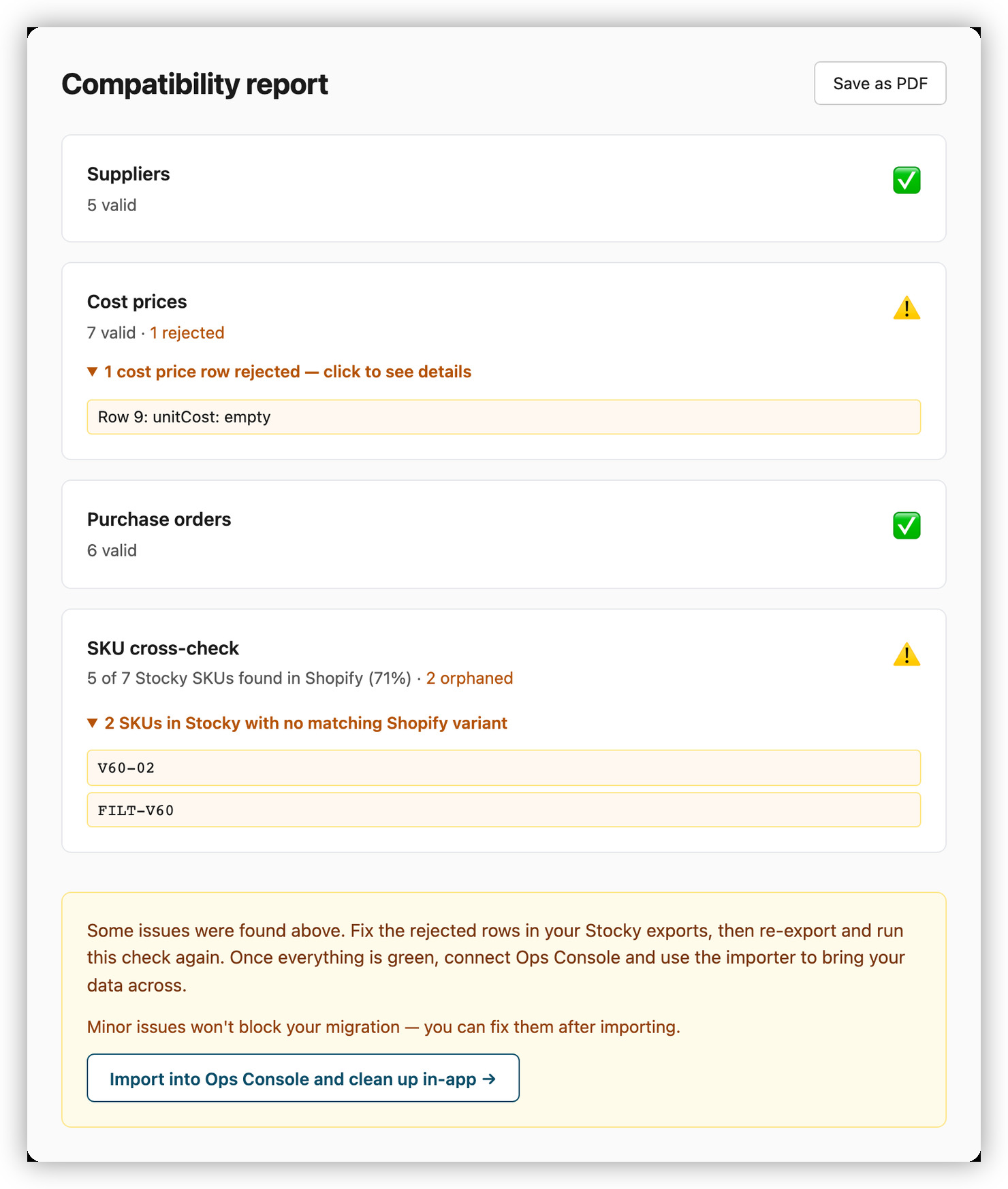
Sample data — your report is built from your own Stocky exports.
Check my Stocky exports — no account needed →What gets checked
The tool parses your Stocky exports against the same logic ops-console uses on import, so there are no surprises when you migrate for real.
Suppliers
Name, email, lead time, payment terms — validated against the ops-console schema.
Cost prices
SKU, unit cost, currency, MOQ per supplier. Flags missing or mismatched SKUs.
Purchase orders
PO lines validated row by row — quantities, expected dates, and the fields the importer requires.
SKU cross-check
Compares your Stocky SKUs against your live Shopify catalog to catch orphans.
Instant results in 60 seconds
Export from Stocky
Download Suppliers, Cost Prices, and Purchase Orders from your Stocky dashboard. Also export Products from Shopify admin.
Upload or connect
Upload your 3 Stocky exports (Shopify export optional — it enables the SKU cross-check), or connect your store for a read-only automated pull. Nothing is stored after your session ends.
Get your compatibility report
Instant pass/fail per data type. Warnings show exactly which rows need fixing before import day.
Ready to migrate? Ops Console is free during the beta.
Ops Console is the Stocky replacement that keeps the purchase-order history and supplier list Shopify can't take: supplier catalog, cost prices, purchase orders, reorder alerts — plus the per-order margin Stocky never did. No App Store install and no OAuth consent screen — you paste a read-only API key you generate in your own Shopify admin.
Frequently asked questions
When does Stocky retire?
Shopify is retiring Stocky on August 31, 2026. After that date you will need another way to manage suppliers, cost prices, and purchase orders.
What transfers from my Stocky export?
The checker validates your Stocky Suppliers, Cost Prices, and Purchase Orders exports — supplier details, per-SKU unit costs, and PO lines — and cross-checks your SKUs against your live Shopify catalog to flag orphans.
Can I bring my historical purchase orders across?
Shopify's own migration guide says historical purchase orders can't be imported into Shopify and suppliers can't be exported from Stocky at all. That's the gap ops-console fills — it keeps your supplier list, cost prices, and purchase-order history queryable after Stocky retires on August 31, 2026.
What does ops-console not replace?
It isn't a full Stocky clone. There's no POS UI extension and no stocktake/count workflow — for those, Shopify's native tools or an ERP fit better. Receiving is covered, though: ops-console has browser barcode scan-to-receive with a plain USB or Bluetooth scanner, matched across every open PO — it's scanning to count that it leaves to Shopify. Otherwise ops-console focuses on what Shopify can't take with you: suppliers, cost prices, purchase-order history, and the per-order margin Stocky never showed.
Do I need an account?
No. The compatibility checker is free and requires no account — upload your CSV files, or connect your store for a read-only pull.
Is my data stored?
No. Nothing is stored after your session ends.